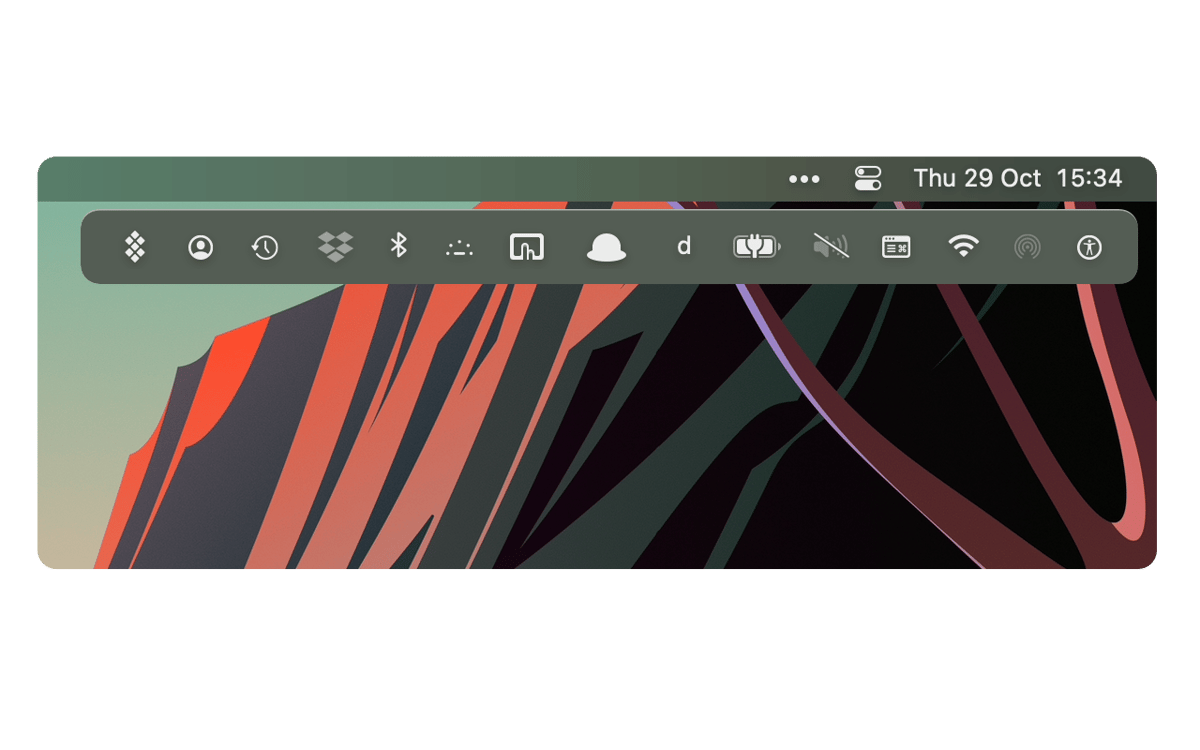
What Is Bartender Software? Bartender 6 Price Guide
Learn what Bartender software does on Mac, how Bartender 6 licensing works, and how Bartender price options compare before you buy.

Essay · cosmiq
Compare Cosmiq and SiteApp with a practical buyer framework, pricing context, and the clearest advantages Cosmiq has for Mac software license shoppers.
By Cosmiq Editorial · · 10 min read
If you are comparing Cosmiq vs SiteApp, start with the category difference. Cosmiq is a software storefront for discounted Mac app license keys. SiteApp, based on the public Site App Pro pages available on April 25, 2026, is a worksite health and safety management platform with employee-based monthly plans.
That means this is not a normal feature-by-feature software comparison. The better question is: what are you trying to buy?
If you want a Mac app such as SoundSource, Bartender, CleanShot X, Alfred, Loopback, or iStat Menus, Cosmiq has the advantage because it is built around individual software purchases. If you need digital forms, contractor management, hazard and incident workflows, attendance, equipment tracking, and dashboard reporting for worksites, SiteApp is aimed at that operational safety job.
Cosmiq is the better fit for software buyers who want discounted Mac app licenses, one-time purchase paths, product-level checkout pages, and a storefront focused on individual apps.
SiteApp is the better fit for teams buying safety management software for construction, contracting, or field operations. Its public pricing page shows monthly plans based on employee counts, with contractor options and higher tiers for larger teams.
So the advantage of Cosmiq over SiteApp is not that Cosmiq replaces SiteApp's safety platform. The advantage is that Cosmiq solves a different buying problem with less overhead: find the app you need, compare the license details, buy the key, and keep your recurring software spend lower.
Cosmiq is an independent software reseller focused on premium Mac apps and discounted license keys. Product pages are built around purchase-ready details: app name, price, original price, supported platform, key features, activation guidance, and related products.
For a buyer, the main benefit is focus. You are not buying a team management platform. You are buying a specific app license for a specific job.
Examples from the current Cosmiq catalog include:
Those are app-level purchases. That matters if your real goal is to add a tool to your Mac setup without taking on another broad SaaS subscription.
The public Site App Pro homepage describes the product as digital health and safety software for worksite operations. Its listed feature areas include digital forms and automation, hazard and incident management, equipment management, site inductions, task management, offline mode, contractor management, dashboards and reporting, and attendance.
The public Site App Pro pricing pages show monthly plans that scale by employee count. In the US pricing page checked on April 25, 2026, the Essential plan starts at $138 USD per month for 1 to 5 employees without contractors, and contractor-inclusive plans start higher. The New Zealand page uses NZD pricing and shows similar employee-count tiers.
That pricing model makes sense for a safety operations platform. It is less relevant if you are simply trying to buy a Mac productivity, audio, utility, security, or creative app.

Cosmiq's biggest advantage is purchase intent alignment. A buyer who searches for a Mac app license key usually does not need an employee-based operations platform. They need a product page, price, activation details, and a checkout path.
That makes Cosmiq easier to evaluate for app purchases. You can compare the current Cosmiq price against the listed original price, check whether the app matches your macOS workflow, and decide without mapping your company size to a SaaS tier.
SiteApp's pricing is monthly and team-sized. That is normal for health and safety SaaS, but it is not the shape most individual Mac app buyers want.
Cosmiq's product pages are simpler for this use case because the buyer evaluates one app at a time. For example, if you need app-level audio control, you can review SoundSource. If you need virtual audio routing, you can review Loopback. If your menu bar is crowded, you can review Bartender 6.
The decision is narrow, and narrow decisions are easier to make well.
Many Mac users are trying to control recurring software costs. A subscription can be useful when you need an ongoing service, a large team platform, or a bundle you actively use every week. It can feel wasteful when you only need one utility.
Cosmiq's advantage is that it gives buyers a way to build a focused app stack around specific tools. Instead of paying monthly for a platform that is unrelated to the immediate software need, you can buy the app that solves the problem.
This is especially relevant for utilities that become part of a daily workflow: menu bar control, audio routing, clipboard history, screen capture, system monitoring, file transfer, or writing.
Cosmiq product pages are naturally comparable because each page centers on a product. You can look at price, original price, app category, platform, feature list, and related products.
That structure helps buyers answer practical questions:
SiteApp is not designed for these app-by-app comparisons. It is designed for operational safety teams comparing plans, employees, contractors, and implementation needs.
When you buy from a catalog like Cosmiq, the product is the point. The page exists to help you understand the app and complete the purchase.
That has a real usability advantage. You are not sorting through implementation packages, employee bands, contractor counts, or enterprise rollout language. For a Mac software buyer, the fewer layers between "I need this tool" and "I can activate this tool," the better.
SiteApp may be the better choice when the purchase is not about Mac apps at all. If you manage worksites and need safety compliance workflows, Site App Pro's feature set is pointed at that problem.
Use SiteApp when you need:
Those are not Cosmiq use cases. Cosmiq is a software license store, not a field safety compliance suite.
Use this short framework before choosing either option:
| Question | Choose Cosmiq when... | Choose SiteApp when... |
|---|---|---|
| What are you buying? | A Mac software license key | A safety management platform |
| Who is the buyer? | Individual user, creator, developer, operator, or small team buying an app | Construction, contractor, or field operations team |
| Pricing shape | App-level purchase | Employee-based monthly SaaS |
| Main value | Discounted software access and focused checkout | Safety workflows, forms, reporting, and compliance operations |
| Evaluation unit | One product at a time | Team size, contractors, integrations, rollout needs |
If you came here looking for Cosmiq's advantage over SiteApp for software buying, start with tools that map to a clear daily workflow.
For audio control, compare SoundSource and Loopback. SoundSource is usually the app-level volume and audio device choice; Loopback is for virtual audio routing.
For Mac productivity, look at Alfred, Bartender 6, BetterTouchTool, and iStat Menus. These tools make sense when you use your Mac all day and want faster control over launching, menu bar clutter, shortcuts, or system status.
For capture and presentation work, CleanShot X and Screen Studio are better starting points than a general platform comparison.
No. Cosmiq is a software storefront for discounted app license keys. SiteApp, referring here to Site App Pro, is a health and safety management platform for worksite teams. The comparison only makes sense if you first clarify what you are trying to buy.
Cosmiq's biggest advantage is focus for software buyers. If you want a Mac app license key, Cosmiq gives you product-level pages, app pricing, related products, and a direct buying path. SiteApp is built for safety operations, not individual Mac app purchases.
They are priced for different jobs. Site App Pro's public US pricing page shows monthly employee-based plans starting at $138 USD per month as of April 25, 2026. Cosmiq product prices are app-specific, with many catalog items listed as discounted one-time purchases.
Choose SiteApp when you need worksite safety management: digital forms, inductions, contractor management, incident tracking, equipment workflows, reporting, and team rollout support. Those are operational needs, not software license shopping needs.
Check the product version, platform support, activation notes, license terms, refund expectations, and whether the app solves a weekly workflow. For best results, buy one app first, confirm it works in your setup, then expand your stack.
For most people asking about Cosmiq vs SiteApp, Cosmiq has the advantage when the goal is buying Mac software. It is focused, app-specific, and easier to evaluate one product at a time.
SiteApp is a better match for safety teams that need health and safety management software. That is a valid use case, but it is not a replacement for a discounted Mac software catalog.
If your immediate goal is to buy a useful Mac app without adding another broad platform subscription, start with SoundSource, Bartender 6, or Alfred, then compare one workflow at a time.
This guide uses Cosmiq catalog data from the local product catalog and public Site App Pro pages checked on April 25, 2026. SiteApp pricing, feature names, and regional plan details can change, so verify current terms before purchase.
Colophon
Per-app volume control & audio routing for macOS
Also in the library
Browse the guides
Compare practical Mac app advice by product, date, and reading time before you dive into the full guide.
Learn what Bartender software does on Mac, how Bartender 6 licensing works, and how Bartender price options compare before you buy.
Learn a safe memory clean Mac OS workflow, compare computer cleaner options, and follow step-by-step guidance on how to clear cache MacBook storage without breaking apps.
Learn how to set up Little Snitch on Mac, build safer outbound rules, and understand traffic alerts. Includes notes for users searching snipit on mac.